From ASCII to Unicode
April 28, 2025Understanding the Foundations of Text Encoding
The Unicode Standard is a universal framework for encoding, representing, and managing text across digital systems — including computers, databases, and operating systems. Introduced in 1991, and maintained by the Unicode Consortium, it defines more than 150,000 characters — covering everything from modern scripts to ancient, even extinct languages. For example, thanks to Unicode, we can now easily render languages like Oji-Cree — a historically endangered language — directly in a browser. (translated here).
How This Deep Dive Will Work
- Each section tackles one key concept or layer of Unicode.
- Summary tables at the end of each section help reinforce learning.
- Real Python code examples are provided throughout — so you can immediately apply the concepts hands-on.
INFO
When a ⧫ appear next to a term, you can hover or click that word and have it lookup a structured explanation of what it means, applies to, examples and more.
By the end, you’ll have a practical, layered understanding of Unicode — from its historical roots to its modern applications in encoding, text processing, and even security.
Because of its ambition to be the final text encoding standard, Unicode is a layered and multi-faceted system. Working with Unicode can seem complex until you grasp those different layers, facets and details; this article aims to explore this carefully by throughful analyses, and by the end of it, my goal for you is that you have a clear mental model of Unicode — what it replaced and how it functions.
Layer Zero: Pre-Unicode — ASCII and Code Pages
The Era Before Unicode
Before Unicode, text encoding was fragmented into various character encodings specific to languages or regions (e.g., ASCII, ISO 8859, and Windows-1252). These encoding standards often conflicted, resulting in garbled text when transferred across systems that used different encoding schemes - a phenomenon that has its own name: mojibake (Japanese for "character transformation", or simply: gibberish).
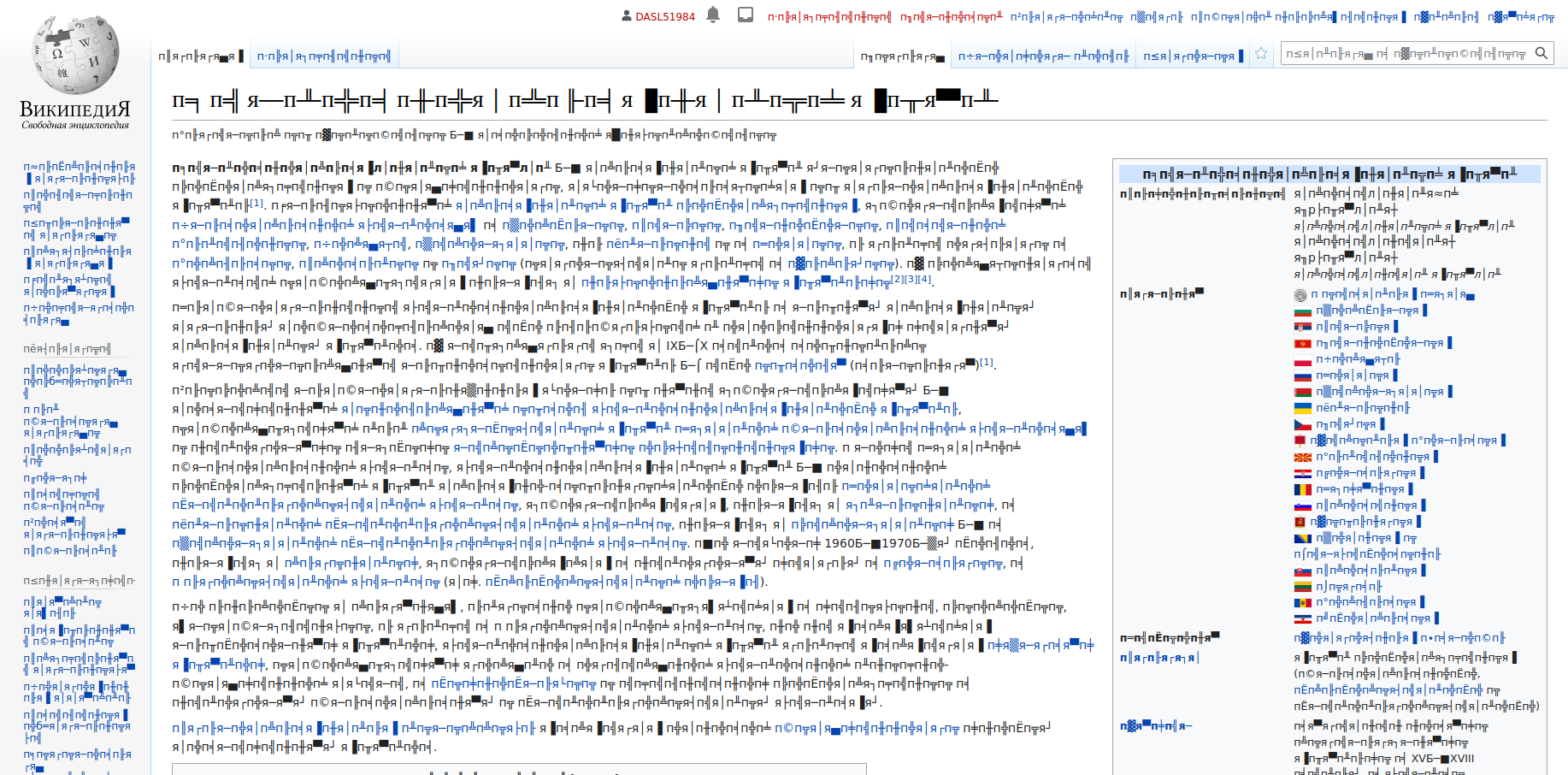
The main initial takeaway is this: Unicode standardizes the representation of text across different languages and platforms. Encodings (like UTF-8⬧) implement Unicode by translating its Code Points⬧ into bytes. Each character we see is simply not just a letter or a symbol - that's its representation (aka. Glyph⬧) - its true nature within the computer is a defined code point, encoded into bytes and then later rendered as a glyph.
Layer One: Why Encoding Matters
Why There’s No Such Thing as "Plain Text"
When dealing with text as bytes, knowing the encoding used to generate those bytes is crucial. This is especially true in I/O operations just take a look at the following examples:
Encoding is often specified by context, for example:
- Over the internet, it’s specified in HTTP headers (e.g.,
"Content-Type: text/html; charset=UTF-8"). - In HTML or XML files, it appears in metadata (
<meta charset="UTF-8">). - In databases (
ENCODING 'UTF8')
But there places that even bites experienced engineers - an example of such are log files which may be whatever encoding the OS feels like, or it may be in an implicit format and working fine until it suddenly breaks; corrupting a database, taking a system offline or something far worse.
Encoding may also be an emergent implicit behaviour of OS-defaults, locale configuration, runtime assumptions, libraries silently coverting strings to bytes or tooling that tries to be helpful - and as long as all components accidentially agrees, everything works — the moment one component disagress however, is where the damage happends (and that's how real production failures happen).
Logfiles are often treated as diagnostic exhaust, not something you take much care of which means encoding is rarely specified, validated or tested end-to-end. And they sit at the intersection of:
- Application code
- OS
- Runtime
- Pipelines
- Storage backend
- Viewer/UI
And nobody owns encoding end-to-end.
FAILURE MODE
MySQL’s legacy 'utf8' encoding only supports up to 3 bytes per character. Emoji are silently truncated or replaced, corrupting production data without errors.
Good Encoding
User status: 💩
Bad Encoding
User status: �
Testing Encodings with Python
import sys

if __name__ == '__main__':
    # Python source files are assumed to be encoded in UTF-8 unless specified otherwise.
    # You can change this behaviour by adding a string like this as the first line:
    # -*- coding: <encoding-name> -*-

    test_string = "Hello World! 🌍" # But strings will be stored internally as Unicode codepoints in Python!
    # This allows for seperation of data and encoding logic - adding flexibility.

    # When priting to the console, it's the console that sets the encoding scheme
    print(sys.stdout.encoding + " " + sys.stdin.encoding)  # utf-8 utf-8
    print(test_string)  # Hello World! 🌍


    utf8_encoded: bytes = test_string.encode("utf-8")
    utf16_encoded: bytes = test_string.encode("utf-16")
    utf32_encoded: bytes = test_string.encode("utf-32")

    print(utf8_encoded)  # b'Hello World! \xf0\x9f\x8c\x8d'
    print(utf16_encoded)  # b'\xff\xfeH\x00e\x00l\x00l\x00o\x00 \x00W\x00o\x00r\x00l\x00d\x00!\x00 \x00<\xd8\r\xdf'
    print(utf32_encoded)  # b'\xff\xfe\x00\x00H\x00\x00\x00e\x00\x00\x00l\x00\x00\x00l\x00\x00\x00o\x00\x00\x00 \x00\x00\x00W\x00\x00\x00o\x00\x00\x00r\x00\x00\x00l\x00\x00\x00d\x00\x00\x00!\x00\x00\x00 \x00\x00\x00\r\xf3\x01\x00'
    # We can see here how the same string is represented differently at the byte level when using different encodings.

    utf8_decoded: str = utf8_encoded.decode("utf-8")
    utf16_decoded: str = utf16_encoded.decode("utf-16")
    utf32_decoded: str = utf32_encoded.decode("utf-32")
    print(utf8_decoded)  # Hello World! 🌍
    print(utf16_decoded)  # Hello World! 🌍
    print(utf32_decoded)  # Hello World! 🌍

    """
    ascii_encoded: bytes = test_string.encode("ascii")
    latin1_encoded: bytes = test_string.encode("latin-1")
    windows1252_encoded: bytes = test_string.encode("windows-1252")
    """
    # These would all fail with a UnicodeEncodeError as the codepoints for the emoji doesn't exists and can't be encoded!
    # You have to watch out for such cases when encoding and decoding data.
    try:
        ascii_encoded = test_string.encode("ascii")
    except UnicodeEncodeError:
        print("Error: The string contains characters that cannot be encoded as ASCII.")
        ascii_encoded = test_string.encode("ascii", errors="ignore")
    finally:
        print(ascii_encoded) # b'Hello World! '
When encoding isn’t specified, heuristics are sometimes used as a legacy compatability-hack and was used in browsers like IE - but they are unreliable and should be avoided. Always specify encoding to avoid misinterpretation.
Layer Two: Scripts, Symbols, and Categories
The first layer of Unicode is that of scripts and symbols.
Scripts
Latin script (also known as Roman script) is based on the classical Latin alphabet used by the Romans and is one of the oldest and most widely adopted writing systems in the world. It's the foundation for many modern languages including English, French, German, Italian, Portuguese and many more. It has evolved to include diacritical marks (e.g., accents like é, umlauts like ü) to adapt to various languages.
Cyrillic script is also a very common script and is used for Russian, Bulgarian, Serbian, Ukrainian, Belarusian, Mongolian and more. Created in the 9th century by Saints Cyril and Methodius to write Old Church Slavonic, the Cyrillic script has since been adapted for numerous languages and it often includes additional letters and modifications to suit the phonetics of specific languages.
Unicode supports current and historic scripts, including extinct languages and as of Unicode v16.0 released in September 2024, the standard includes 168 scripts (that's a lot - we only very briefly talked about two!).
Symbols
Symbols are characters that are not part of a writing-system (a script), but serve other purposes such as emojis, mathmatical operators or geometric shapes for instance. They may be:
- Mathematical symbols
+,-,∑,∫ - Currency symbols
$,€,¥,₹ - Emojis
😊,😂,🥲,🍎,🍕,🐍,🐘
You can easily test whether a Unicode character is a symbol or part of a script in Python:
def is_symbol(char):
    """
    So: Other symbols (e.g., ♔, ♫)
    Sc: Currency symbols (e.g., $)
    Sm: Mathematical symbols (e.g., +, ×)
    Sk: Modifier symbols (e.g., ^, ~)
    """
    category = unicodedata.category(char)
    return category.startswith("S")  # an 'S'-prefix indicates symbol categories
The Intersection of Scripts & Symbols
Scripts and symbols are not rigid, mutually exclusive categories in Unicode. Instead, scripts often contain symbols, and the distinction between them can be fluid, depending on how they are used and categorized in Unicode. While a script is usually thought of as the collection of alphabetic characters or logograms, many scripts also combes bundled with symbols, such as:
- Latin Script:
@,$,%,&
This will become a bit more clear, once we start talking about code blocks and code points.
Layer Three: Code Points and Code Blocks
Code Blocks & Code Points
Unicode is a semantic system working in so-called code-points, it doesn't handle appearances - for that we have fonts. Rendered code points are referred to as glyphs and may vary across fonts.
Unicode uses two other concepts that are functionally significant of code blocks and code points. Unicode assigns each character a unique numerical (hexadecimal) value preprended with U+, e.g. U+2638.
Codepoints range from U+0000 to U+10FFFF. The set of all code points are divided into contiguous ranges for different languages and categories.
Characters, not glyphs!
Unicode standardizes characters and not glyphs which is the visual representation of a character. Different fonts can render the same Unicode code point (character) with different representations and typographic styles - these different representations of codepoints/characters are called glyhphs.
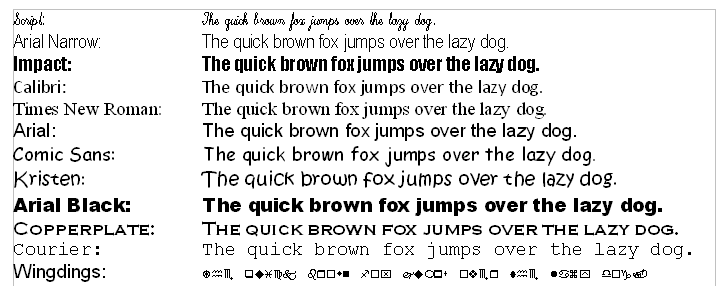
Unicode is therefore not a text-encoding scheme; it’s a map of code points (numerical values) that point to characters and it's used by encodings like UTF-8, UTF-16, and UTF-32. Unicode describes neither how those characters are stored in memory or transmitted as bytes - for that we use encoding like UTF-8, UTF-16 or UTF-32 (UTF: Unicode Transformation Format).
Some scripts, like Armenian, represent only one language, while others, like Latin, are used by multiple languages, including English, French, and Vietnamese.
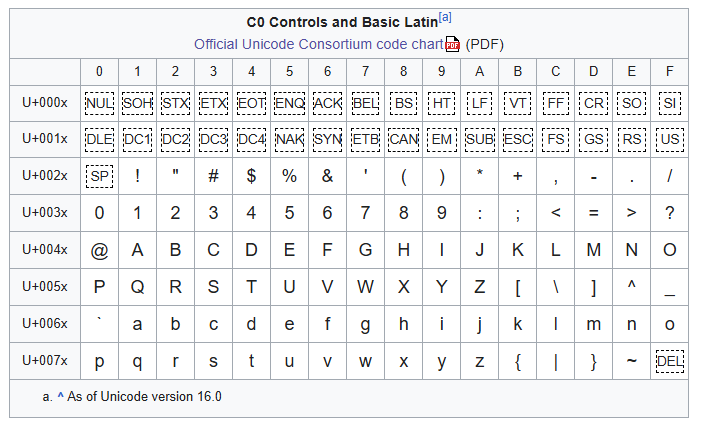
Basic Latin script (see image) spans code points U+0000 to U+007F and includes the English alphabet. If we convert the codepoints from hex to decimal, you'll notice the range is 0-127 which is the exact same codepoints used in standard ASCII for the same characters - this is because Unicode is backwards compatible with ASCII. This means that any text encoded in ASCII can be safely interpreted by any system that uses Unicode.
If you take the string "Hello", it can be represented as:
- In ASCII:
H = 72,e = 101,l = 108,o = 111(all in the 0–127 range). - In Unicode: The code points for "Hello" in Unicode are
U+0048(H),U+0065(e),U+006C(l),U+006C(l),U+006F(o). These are identical to ASCII code points.
Layer Four: Unicode Planes
(Note: You haven't written anything yet specifically about Planes — BMP, SMP, etc. I can generate a fitting paragraph here if you want.)
Placeholder: To Be Written
Layer Five: Encodings — UTF-8, UTF-16, UTF-32
UTF-8 is a variable-length encoding that represents Unicode code points in 1 to 4 bytes. It’s backward-compatible with ASCII, meaning ASCII text is also valid UTF-8 text.
Example:
- The letter "A" (code point U+0041) in UTF-8 is encoded as a single byte (0x41).
UTF-8 is widely used on the web and is often the default encoding in systems, programming languages, and applications.
Notes on Encoding Variants
- UTF-16 uses 2 or 4 bytes per character, which can be beneficial for languages with many non-ASCII characters but has disadvantages in storage efficiency.
- UTF-32 uses 4 bytes per character uniformly, offering simple processing but with significant storage costs.
In most applications, UTF-8 is the best choice due to its compatibility and efficiency but they all have their place, which I'll get to later.
Why the Fuss About Unicode?
Why not just stick with ASCII? ASCII only covers 128 characters — barely enough for basic English. Unicode, however, aims to cover all text systems in a single, universal standard, eliminating the confusion and compatibility issues of past encoding schemes.
In the early 90s, the internet accelerated Unicode’s adoption as more text needed to be exchanged globally. Unicode incorporates characters from legacy encodings (e.g., Windows-1252) to ensure backward compatibility.
Common Unicode Myths
-
"Unicode is 16-bit and has 65,536 characters." Incorrect. Unicode is not limited to 16 bits. While early Unicode proposals suggested a 16-bit system, Unicode today spans over 1 million code points (0 to 0x10FFFF).
-
"Unicode is an encoding." Also incorrect. Unicode is a standard, not an encoding. UTF-8, UTF-16, and UTF-32 are encoding formats that define how to represent Unicode code points in bytes.
Practical Advice for Working with Unicode
Handling Unicode effectively requires knowing:
- The level of representation you’re dealing with — code points, bytes, or glyphs.
- Encoding consistency — never assume encoding, especially for data from unknown sources.
Modern systems default to UTF-8, but misinterpretations can still occur, often with ISO-8859-1 (latin1) or cp1252 on legacy systems.
Exploring Unicode in Python
Here's a Python example to illustrate basic Unicode encoding and decoding.

 print(chr(0x1F64F)) # (Unicode character represented by code point U+1F64F)
 print(chr(0x1F64F)) # (Unicode character represented by code point U+1F64F)
 🙏
 # Also, chr() creates characters from code points.
 # We could do chr(0xFF) or chr(33)
 print(hex(ord("🙏"))) # -> 0x1f64f
 # ord() is the reverse operation - giving us the base10 codepoint for a specific character
 [ord(i) for i in "hello world"] # -> [104, 101, 108, 108, 111, 32, 119, 111, 114, 108, 100]

 # We can represent characters in many analogue ways
"""
Escape Sequence     Meaning                                           How To Express "a"
"\ooo"              Character with octal value ooo                    "\141"
"\xhh"              Character with hex value hh                       "\x61"
"\N{name}"          Character named name in the Unicode database      "\N{LATIN SMALL LETTER A}"
"\uxxxx"            Character with 16-bit (2-byte) hex value xxxx     "\u0061"
"\Uxxxxxxxx"        Character with 32-bit (4-byte) hex value xxxxxxxx "\U00000061"
"""
print(
     "a" ==
     "\x61" ==
     "\N{LATIN SMALL LETTER A}" ==
     "\u0061" ==
     "\U00000061"
     ) # Prints `True` as they are all identical
 # bin, hex and oct are only representations, not a fundamental change in the input.
     >>> import unicodedata
 >>> unicodedata.name("€")
 'EURO SIGN'
 >>> unicodedata.lookup("EURO SIGN")
 '€'
 str(b"\xc2\xbc cup of flour", "utf-8") # -> '¼ cup of flour'
 str(0xc0ffee) # -> '12648430'

 text = "Hello, Unicode! 🌍"
 utf8_encoded = text.encode('utf-8')
 print(f"UTF-8 Encoded: {utf8_encoded}")
 utf8_decoded = utf8_encoded.decode('utf-8')
 print(f"Decoded Text: {utf8_decoded}")

 emoji = "🤨"  # U+1F928
 print(f"Emoji bytes in UTF-8: {emoji.encode('utf-8')}")
Encoding text with UTF-8 converts characters into byte representations, which is crucial for I/O operations.
Layer 6: Unicode Properties
Layer Six: Unicode Properties (Note: You haven't specifically explained General Categories, Bidi properties, Numeric values, Combining classes yet.)
Placeholder: To Be Written
Layer 7: Unicode Normalization
Layer Seven: Unicode Normalization (Note: You haven't yet explained NFC, NFD, NFKC, NFKD normalization.)
Placeholder: To Be Written
Layer 8: Unicode Security Issues
Layer Eight: Unicode Security Issues (Note: You haven't yet covered homoglyph attacks, Trojan Source attacks, zero-width attacks.)
Placeholder: To Be Written
Layer 9: Unicode in Systems and Protocols
Why There’s No Such Thing as "Plain Text" (continued)
(Your examples fit here too because you explain encoding in internet protocols, HTTP headers, etc.)
- Over the internet, it's specified in HTTP headers...
- In HTML/XML, it's in
<meta charset="UTF-8">...
Layer 10: Advanced Unicode Algorithms
Layer Ten: Advanced Unicode Algorithms (Note: You haven't yet covered Unicode Text Segmentation (TR29), Collation (sorting), Bidirectional Algorithm.)
Placeholder: To Be Written
Further Reading
https://peps.python.org/pep-0263/ PEP 263 – Defining Python Source Code Encodings| Encoding | Byte Length | Supports | Use Cases |
|---|---|---|---|
| ASCII | 1 byte | Basic English | Legacy systems, programming, protocols |
| ISO-8859-1 | 1 byte | Western Europe | Web pages, legacy databases, email |
| UTF-16 | 2 or 4 bytes | All Unicode | Java, Windows, some databases |
| UTF-32 | 4 bytes | All Unicode | Some internal systems, databases |
| Windows-1252 | 1 byte | Western Europe | Legacy Windows apps, web pages |
| Shift-JIS | 1 or 2 bytes | Japanese | Japanese text encoding |
| GB2312 | 2 bytes | Simplified Chinese | Chinese mainland web pages, files |
| Big5 | 2 bytes | Traditional Chinese | Taiwan, Hong Kong legacy systems |
| EBCDIC | 1 byte | IBM Mainframes | IBM mainframe systems |